
About O'mari
The "O" in O'mari represents the circle of life, the people around you and your everyday challenges that motivate and inspire us to offer you relevant solutions.
A great range of products to manage your everyday life.
.png?width=210&height=146&format=webp&quality=100)
.png?width=210&height=146&format=webp&quality=100)
.png?width=210&height=146&format=webp&quality=100)

Once registered, you can proceed to download the O'mari Mobile App
Registration on O’mari is quick and easy. Using any network, you can self-register for an all-in-one ZiG/USD wallet in just 60 seconds.
You can register on your preferred platform: USSD, Mobile App or WhatsApp. Below are the simple steps to register using USSD:
.jpg)
- Certified copy of Certificate of Incorporation.
- Resolution from the Board of Directors approving of the appointment or use of the company as a Domestic Remittances Agent or Merchant and appointing the authorised account signatories. Alternatively, a letter authorising OMDS to create account.
- Certified copy of CR6 (Formerly Cr14).
- Tax Clearance Certificate.
- Coloured passport photos of the Directors and authorised account signatories.
- Certified copies of authorized account signatories' and Directors' national identity documents.
- Proof of Residence of the Directors or proof of physical address for the company's business premises.
- Company's trading shop licence.
- Bank statement for the past 3 months.
- A list of all your branches.
You can now become an O’mari Agent or Merchant. To get started, simply meet a few requirements outlined below:
- USSD - dial *707# and follow the easy prompts to register yourself for O’mari services on any network, including Econet, NetOne and Telecel.
- WhatsApp- save the number 0774 707 707, send ‘hi’ to the saved O’mari contact and self-register to access O’mari services successfully.
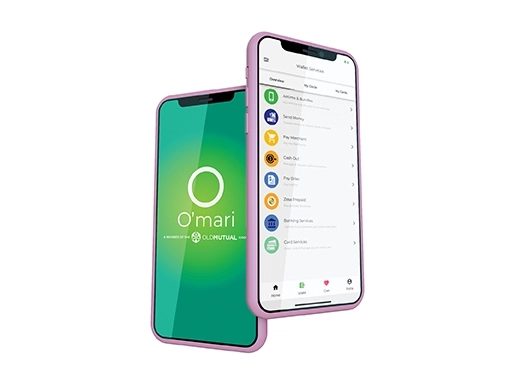
- .Mobile App- Download the O’mari Mobile App on Google PlayStore for Android Smartphones or iPhone AppStore and self-register in less than 60 seconds to start enjoying O’mari services.
- ZIPIT(Receive Money)- receive money from another O’mari wallet, any mobile wallet (EcoCash, OneMoney and/or TeleCash), and any bank nationwide.
- Wallet to Bank (Banking Services)- send money from any of your bank accounts to your O’mari wallet. (NB:- Check with your bank to see if you are now able to link to O’mari)
O’mari is a FinTech (financial technology) business, an Old Mutual subsidiary that offers mobile money services, insurtech, investec, digital lending, e-commerce, payments and digital products and services for the retail mass market.
The business has a vision to ‘create better everyday lives, today and tomorrow.’
Registration is very easy and paperless. This means that there is no need for any copy of ID or national identification documents. O’mari can be accessed via three channels, which include:
Opening an O’mari wallet is absolutely free.
All you need to do is dial *707#, or send ‘hi’ on WhatsApp to 0774707707, or download the O’mari Mobile App on Google PlayStore or AppStore and follow the easy prompts to self-register.
You can use any of the below options to fund your wallet and transact across the various services available:
Access your O’mari wallet via USSD, WhatsApp or the Mobile App, select the Wallet Services option and follow the simple steps to link your bank account to your O’mari wallet to fund your wallet anytime. (NB:- Check with your bank to see if you are now able to link to O’mari)
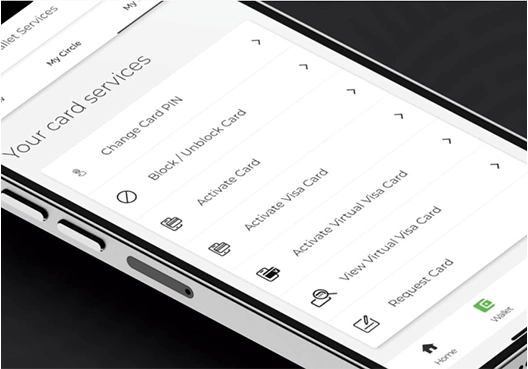
O’mari has a Debit Zim Switch card for ZWL transactions and a VISA card for USD transactions. The cards come in various colours you can choose from.
With your Zimswitch Debit card, you can pay for your goods and services at any merchant nationwide.
With your VISA Debit card, you can swipe at any merchant, make payments online and travel with your card internationally.
You can only open one O’mari wallet as an individual, but feel free to tell friends and family about the O’mari wallet so that you can enjoy some exciting rewards when you transact within your Circle.
The O’mari wallet allows you to transact in both ZWL and USD all on one wallet.
A: Not at all. If you do not own a smartphone, you can still access Omari services when you dial *707# which works across all networks, whether you have Econet, NetOne or Telecel.
A: Yes, you can buy airtime for you and your loved ones for any networks using your O’mari wallet.
Get in touch with our Contact Centre for assistance or visit your nearest O’mari channel partner on any of the below details:
Contact Details
Toll-free number: 433
Landline: +263242308400
SIP Line: 433
WhatsApp: 0719433433
Email: contactus@oldmutual.co.zw
You can also visit any of our CABS branches, CABS Agents and Old Mutual GreenZones for assistance.
The O’mari wallet’s various channels have been enabled with security authentication features that include PIN verification, OTP, and a security authentication portal that allows you to enter your PIN on a securely verified platform before returning back to complete your transaction.
If anyone has access to your phone due to loss, theft or any other malicious act; they will not be able to access your O’mari wallet as you are required to enter your PIN to authenticate transactions. Ensure that you do not share your wallet or card PIN with anyone.